
Creating effective user guides isn’t just about documenting features, it’s about transforming confusion into confidence. When customers purchase your product or download your software, they’re investing in a solution. Your responsibility? Ensure they can unlock that value without frustration.
Understanding What Makes User Guides Essential
Think of user guides as your 24/7 support team. These documents work tirelessly, answering questions before customers even need to ask. Whether you’re shipping physical products or launching digital tools, comprehensive documentation bridges the gap between purchase and proficiency.
A well-crafted guide does more than explain, it educates. Your users receive step-by-step instructions that turn complicated processes into manageable tasks. From installation procedures to troubleshooting tips, every piece of information serves a purpose: helping users succeed.
Research shows that 84% of technology users don’t fully utilize core features in their software. This knowledge gap represents a massive opportunity. By providing clear, accessible documentation, you’re not just filling information voids, you’re driving product adoption and building lasting customer relationships.
What Should Your User Guide Include?
Product Introduction and Overview
Start with a product introduction that sets expectations. Users need context before diving into technical details. Provide an overview explaining what your guide covers and why it matters to their workflows.
Installation and Setup Instructions
Installation and setup sections offer quick reference points. Guide users through getting your product ready for use, whether that means assembling components or configuring software. Keep instructions concise and sequential.
Feature Explanations
Feature explanations showcase capabilities. Different user groups need different information. Sales teams require different guidance than data analysts. Explain how core features work alongside advanced functionalities, ensuring various skill levels find relevant content.
Troubleshooting and FAQs
Troubleshooting sections teach problem-solving. When errors arise during setup or regular use, users want immediate answers. Address common challenges proactively. Include FAQ pages covering frequent questions that typically generate support tickets.
Glossary of Terms
A glossary helps with technical terms. When industry jargon appears throughout your documentation, define it. Users shouldn’t need external resources to understand your content.
Benefits That Drive Business Growth

Faster Time-to-Value
Faster time-to-value means higher adoption rates. When customers can adopt your product quickly, they achieve results faster. Clear guides shorten learning curves, allowing users to integrate your solution into their workflows efficiently.
Self-Service Support
Self-service support deflects tickets dramatically. A 2022 survey revealed that 95% of companies saw increased demand for self-service channels. Customers prefer finding answers independently rather than contacting support. Comprehensive guides deliver that autonomy while empowering your support teams to focus on complex issues.
Reduced User Friction
Reduced user friction prevents attrition. Nothing frustrates users more than knowing a solution exists but being unable to access it. When you enable proficiency with minimal intervention, you’re building confidence. Confident users explore features and become product advocates.
Enhanced Product Knowledge
Enhanced product knowledge surfaces hidden capabilities. Many users never discover advanced functionalities. Contextual walkthroughs and guided tips help them maximize your product’s potential, increasing perceived value and strengthening loyalty.
Types of Guides That Meet Different Needs
Instructional Manuals
Instructional manuals provide thorough introductions for complex software. These comprehensive documents help users get set up with enterprise systems, healthcare platforms, or technical applications.
How-To Guides
How-to guides focus specifically on tasks. Using concise language, they explain instructions for users already somewhat familiar with your product. These work perfectly for SaaS platforms where users need quick solutions to specific problems.
Training Manuals
Training manuals educate teams using real-world scenarios. Whether for internal teams or external customers, these documents show exactly how to solve problems using your product. Incorporate them into onboarding programs and employee training.
In-App Guidance
In-app guidance delivers learning at the moment of need. Product tours, interactive walkthroughs, tooltips, and contextual help provide support that traditional documentation lacks. This format drives adoption because it meets users where they already work.
Knowledge Bases
Knowledge bases centralize all educational content. From training manuals to support articles, these repositories give users a single location to answer questions, troubleshoot errors, and deepen understanding. Clear organization makes them highly effective.
How to Build Guides That Actually Work
Use Clear, Accessible Language
Use clear language accessible to all proficiency levels. Short sentences without technical jargon increase readability and comprehension. Users solve problems faster when they understand instructions immediately.
Organize Information Hierarchically
Organize information hierarchically. Headings, subheadings, and bullet points create logical flow. Label different topics clearly and break content into separate guides if features or use cases differ significantly.
Include Visual Elements
Mix images, videos, and GIFs generously. Digital processes are hard to explain without showing users exactly what to look for. Screenshots, diagrams, and animated visuals make guides easier to digest.
Optimize for Search
Make content searchable through search engines. Optimize your support articles with relevant keywords users include in search queries. This ensures customers find answers when they need them most.
Create Contextual Guidance
Create contextual guidance for different user types. Your audience has varying needs, proficiency levels, and success measures. Training for sales teams looks completely different from training for executives. Personalized guides accommodate these differences.
Track Guide Performance
Collect analytics on guide usage. Track content engagement rates, clicks, and completion rates. Monitor which content benefits users most and which leads to drop-offs. Use this data to identify improvements and new guides worth creating.
Gather User Feedback
Gather user feedback directly. Qualitative data helps recognize patterns faster. Feedback uncovers nuanced issues easy to miss. Use feedback forms or direct communication to collect this information and iterate on your guides.
Real-World Examples That Inspire
Companies using digital adoption platforms create in-app guidance contextual to employee workflows. One enterprise implemented business software across 1,200+ employees. They built in-app task lists, step-by-step flows, and contextual tips. This reduced time-to-proficiency for new employees while offering self-help support for common issues.
Mental health platforms scaled operations by creating in-app user guides for practitioners. Using no-code editors, they built product tours and tooltips helping their community grow from 200 to 2,000 users rapidly. Contextual tips were engaged over 500,000 times in six months.
SaaS procurement platforms serving customers across multiple countries needed multi-language guides contextual to different user types. They created guidance for various roles and industries—each requiring contextual support depending on business outcomes, language preference, and technical expertise.
Attribution platforms use wiki-style guides providing all information customers need, from installing applications to understanding technical terminology and setting up advanced features. This approach ensures customers experiencing issues find answers quickly.
Athletics management apps with over one million users embedded self-support directly into their platform. Starting from the login page, they provide contextual support for parents, students, and administrators. Field validation tips guide new users through registration, followed by product tours explaining core features and workflows.
Tools That Simplify Guide Creation
Digital Adoption Platforms
Digital adoption platforms offer no-code editors for creating in-app guidance. Launch product tours, step-by-step flows, on boarding checklists, and field validations without technical complexity. These platforms can automatically organize product documentation into searchable self-help widgets.
Screen Recording Tools
Web-based recorders capture on-screen workflows and automatically generate step-by-step guides in seconds. Document digital processes into visual tutorials complete with annotated screenshots and concise text instructions.
Knowledge Base Software
Knowledge base software helps design customer portals housing all documentation. Build searchable knowledge centers with advanced search capabilities and flexible editing options.
Distribution Strategies That Reach Users
Share Internally
Share guides with employees through your knowledge base or documentation tool. Send company emails and organize content in team workspaces. Create categories and folders helping teammates find related information quickly.
Build Customer Help Centers
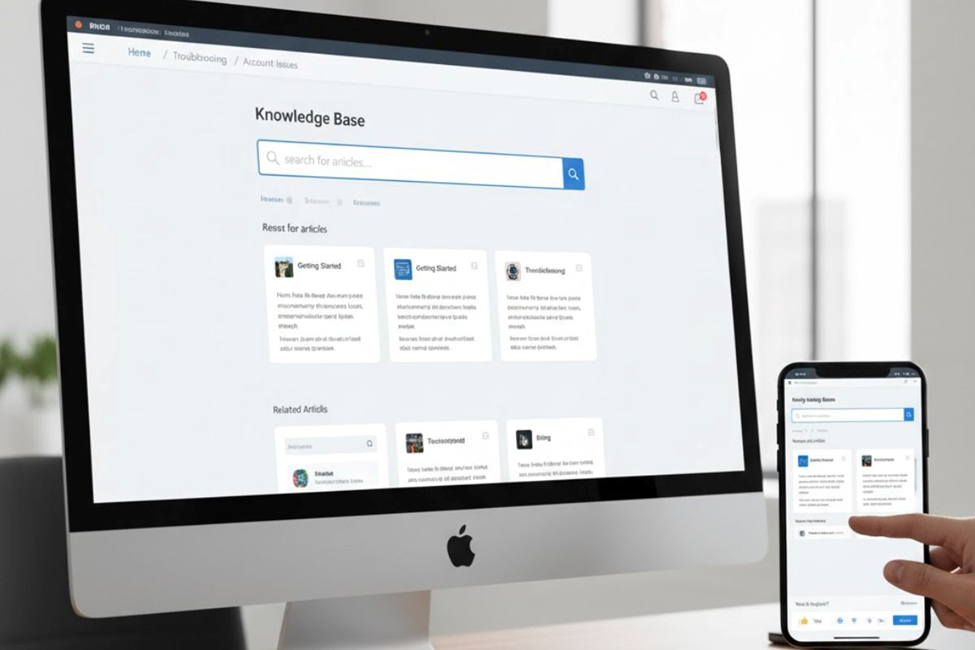
Add guides to your help center for customers. Build FAQ pages with how-tos answering common queries paired with practical examples. Write with empathy, avoiding technical jargon that might confuse users.
Optimize for Content Marketing
Optimize guides for content marketing. Include keyword-rich headings and titles throughout your content. Maintain consistent tone and style while making content visually appealing with annotated screenshots.
Implement Feedback Loops
Incorporate feedback loops ensuring guides stay current. Processes and tools inevitably change. Use guide creators with built-in feedback features letting users alert you when steps become outdated. This ensures your documentation remains accurate and valuable over time.
Conclusion
Creating user guides doesn’t have to be complicated; it just needs to be intentional. Start with what your customers struggle with most, document it clearly with visuals, and make it easily accessible. Your guides will reduce support tickets, speed up on boarding, and turn confused users into confident advocates who actually get value from what you’ve built.
Frequently Asked Questions
What’s the difference between a user guide and a how-to guide?
User guides provide comprehensive product documentation, while how-to guides focus on completing specific tasks or solving particular problems.
How long should a how-to guide be?
Keep it as short as possible while covering all necessary steps, typically 300-800 words with screenshots works best for most tasks.
Do I need technical writing skills to create user guides?
No, just write like you’re explaining to a friend. Clear language and step-by-step screenshots matter more than formal writing experience.
How often should I update my product guides?
Review guides quarterly and update immediately when features change. Use analytics to prioritize updating your most-viewed content first.
What’s the best format for how-to guides in 2025?
Mix formats based on user preference: in-app tooltips for quick help, video walkthroughs for complex processes, and searchable articles for reference.
No Comments yet!