
Entire Snapchat video downloader is developed to help users download videos and images posted online by themselves. This game changing tool allow you to download your favorite Snapchat videos directly to your device, so you can enjoy them anytime, anywhere. You can download a viral videos that you like online. Snapchat Video Downloader puts the power in your hands to preserve those precious memories with just a few clicks.
How to Download Snapchat Video
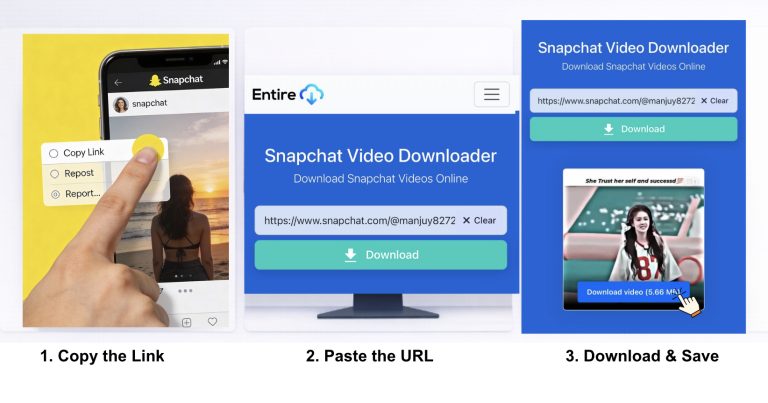
Features:
1. Download Videos Without Watermark
You can download videos from Snapchat without any watermark. Our tool is designed to erase watermark upon downloading a video.
2. Free to Use Service
Unlike other tools online that either charge for downloads or impose limits, the Entire Download Snapchat video downloader tool is free without restrictions or limitations. This is why Entire Download Snapchat video downloader has the best ratings.
3. No Signup Required
To download content from Snapchat, You must have an account with snapchat to copy your download URL. Snapchat do not have a download option to view any videos or stories without logging in. while snapchat restrict direct download from it website, Entire Download Snapchat Video Downloader does not require you to sign up to download any content from Snapchat. It is very easy to use with hassle-free user experience.
4. Unlimited Download Service
There is no limit to downloading videos from Snapchat using our tool. You can download unlimited Videos without any interruption with our Snapchat Video downloader tool.
How to Copy Snapchat Video Download Link
Snapchat Stories:
Step 1: Open Snapchat
Launch the Snapchat app on your smartphones or visit snapchat.com on your web browser if using a desktop computer.
Step 2: Navigate to the Story
Find the public story you want to download by browsing your feed, exploring the Discover section, or searching for a specific username.
Step 3: Access Share Options
Tap on the story to view it, then look for the three-dot menu (⋮) or the share icon, usually located in the bottom-right or top-right corner.
Step 4: Copy the Link
Tap “Share” or “More,” then select “Copy Link” from the menu: the Snapchat story URL will be copied to your device’s clipboard automatically.
Snapchat Spotlight Videos:
Step 1: Open Spotlight
Launch Snapchat and tap the Spotlight tab (the play button icon) at the bottom center of your screen to browse trending videos.
Step 2: Find Your Video
Scroll through Spotlight content until you find the video you want to download, watch it to ensure it’s the right one.
Step 3: Tap the Share Button
While viewing the Spotlight video, tap the share icon (usually an upward arrow) located on the right side of the screen.
Step 4: Select Copy Link
From the sharing options that appear, tap “Copy Link” to save the Spotlight video URL to your clipboard for downloading.
Individual Snaps:
Step 1: Open the Snap
View the snap you want to download from your chat messages or from a friend’s story in your Snapchat feed.
Step 2: Access Options
Tap and hold on the snap (not too long to avoid triggering other features), then release to reveal the options menu.
Step 3: Share the Snap
Tap the share icon or the three dots, then select the sharing options to access the URL copying feature.
Step 4: Copy the URL
Choose “Copy Link” or “Share Link” from the menu: the direct snap URL will be copied and ready to paste into our downloader.
Snap Map Videos:
Step 1: Access Snap Map
Pinch the camera screen or tap your Bitmoji icon to open Snap Map, where you can see location-based stories from around the world.
Step 2: Select a Location Story
Tap on any highlighted area or story bubble on the map to view public snaps shared from that location.
Step 3: View the Video
Browse through the location-based content until you find the video you want to save and tap to play it.
Step 4: Copy the Link
Tap the share icon or three-dot menu while viewing the video, then select “Copy Link” to grab the Snap Map video URL.
Quick Tips for Copying Links:
• Always use the share button (arrow icon) rather than trying to manually construct URLs for best results
• Make sure content is public : Private snaps and stories don’t generate shareable links that work with downloaders
• Copy the complete URL : Shortened links (t.snapchat.com) work fine, but ensure you copy the entire link without truncation
• Paste immediately : Clipboard content can be overwritten if you copy something else before using our downloader
• Desktop users : Right-click the address bar on snapchat.com and select “Copy” for direct URL access when viewing content
Frequently Asked Questions
Yes, Entire Download Snapchat video downloader is safe developed to be user-friendly. You can securely download Snapchat videos in any format.
The answer is yes. However, it is against the policy of Snapchat to post the content of other creator.
Snapchat gives the option to edit the videos, but we recommend you to use editing software i.e. Capcut and Adobe Aftereffects to edit the videos.
When you download the videos from Snapchat video downloader, it will save directly to your phone gallery or video folder.
Most videos download within seconds. Our advanced extraction technology processes and delivers content instantly, regardless of video length or quality.
Yes, our web-based tool works directly in any browser without requiring the Snapchat app or any software installation, just visit our website and download.
Copy the video link from Snapchat, open your Android browser, paste it into our downloader, and tap download: the video saves automatically to your gallery or Downloads folder.
Absolutely! Copy the Snapchat link, open Safari or any browser on your iPhone, visit our downloader, paste the URL, and download directly to your Photos app.
Yes, completely free with unlimited downloads, no registration required, no subscription fees, and no hidden costs, download as many videos as you want at zero charge.
EntireDownload.com is an independent third-party tool and is not affiliated with, endorsed by, or sponsored by Snap Inc. or Snapchat. This service is designed only for downloading publicly available video content, such as Spotlights and Public Stories, shared by users. We strongly respect the content ownership of creators. Please ensure you have the right, consent, or legal permission to download and use the content before proceeding.
Preserve the Moment: Download Any Public Snapchat Video in Seconds
Snapchat is the home of spontaneous, ephemeral content, but sometimes a viral Spotlight video or a creative Public Story deserves to be saved forever.
Welcome to the EntireDownload Snapchat Video Downloader—the fastest, easiest, and most reliable way to turn a fleeting Snapchat link into a permanent, high-quality MP4 file on your device. Just like our industry-leading Instagram downloader, our Snapchat tool is entirely free, requires no login, and leaves no digital footprint on your Snapchat account.
Why Choose EntireDownload for Snapchat?
Snapchat’s core design revolves around content that disappears, making it notoriously difficult to save publicly shared videos and Snaps. Our dedicated tool is built to bypass those friction points, offering a seamless download experience.
| Feature | EntireDownload Advantage | Your Benefit |
| No Login Required | We only need the video’s URL, not your credentials. | 100% Account Safety. Your Snapchat account is never compromised. |
| High-Quality MP4 | Downloads videos in the highest available resolution. | Crystal-Clear Quality. View, edit, or share the video without pixilation. |
| Spotlight & Public Stories | Optimized to detect and retrieve content from all publicly visible sections. | Versatile Functionality. Save the biggest trends and the best public narratives. |
| Speed & Reliability | Built on a powerful, frequently updated server infrastructure. | Instant Gratification. Downloads begin in seconds, regardless of video length. |
| Universal Compatibility | Works perfectly on any device: mobile phone, tablet, or desktop. | Access Anywhere. Download on the go or from the comfort of your computer. |
How to Download Snapchat Videos: A 3-Step Guide
Our tool simplifies the download process to just a few clicks, making sure you get the content you want without complicated software or tedious steps.
Step 1: Get the Public Snapchat Video Link
Open the Snapchat app and navigate to the Spotlight video or Public Story you want to save.
Tap the Share icon (usually an arrow or three dots).
Select “Share Link” or “Copy Link”. This copies the video’s unique public URL to your clipboard.
Step 2: Paste the Link into EntireDownload
Return to the EntireDownload Snapchat Video Downloader page on your browser.
Paste the copied link into the designated input box above.
Click the blue “Download” button.
Step 3: Choose Quality and Save
The tool will quickly process the link and display a preview of the video with available quality options (e.g., 720p, 1080p).
Select your preferred quality and click the final “Save MP4” button.
The video will instantly save to your device’s downloads folder (or camera roll on mobile).
Understanding Snapchat Content and Ethical Use
It is critical for all users of our Service to understand the nature of Snapchat content and to use our tool responsibly.
What Our Tool CAN Download
Our downloader is an ethical tool designed to save only content that is meant for a public audience, where the original creator has chosen to make it visible to anyone on the platform. This includes:
Spotlight Videos: The platform’s public, viral, short-form video feed.
Public Stories: Stories shared by verified creators, celebrities, or businesses that are visible to anyone, not just friends.
Snap Map Public Content: Snaps submitted to the Snap Map feature and made globally public.
What Our Tool CANNOT Download
For your security and to uphold privacy laws and Snapchat’s Terms of Service, our tool can NOT access any private or protected content. You will never be asked to log in, which ensures we cannot access:
Private Snaps/Chats: Disappearing messages sent between two users.
Private Stories: Stories only visible to a user’s approved friends list.
Memories: Your personal archive of saved Snaps.
Account Information: Any information tied to a private, logged-in account.
WE DO NOT CONDONE OR SUPPORT THE DOWNLOAD OF PRIVATE, EXPLICIT, OR COPYRIGHTED CONTENT WITHOUT PERMISSION. Use this tool only in compliance with all local laws and the rights of the original creator.
The Technical Advantage: Why Our Downloader Stands Out
While there are many copycat tools, EntireDownload is built for efficiency and security, offering an unparalleled user experience:
Zero Footprint Technology: Because we never ask for your login details, you are not subject to the risks associated with unauthorized third-party apps that violate Snapchat’s policies and can lead to an account ban. Your use is anonymous.
Adaptive Retrieval: Snapchat frequently changes its content structure. Our developers continuously monitor and update the retrieval algorithms to ensure a consistently high success rate, even when other tools fail.
Clean Output: Every download is processed to ensure the output MP4 file is clean, free of watermarks, and ready for immediate use.
Server Stability: Our tool is hosted on high-speed, dedicated servers to handle large volumes of downloads without slowing down or crashing, providing a reliable experience 24/7.
The internet is built on the promise of permanence—yet, some of the most dynamic content is designed to disappear. Platforms like Snapchat and even Instagram Stories/Reels have embraced ephemerality, creating a vibrant but fleeting cultural landscape. This trend has created an unusual, vital role for third-party tools like our video downloaders: digital archaeology.
These tools don’t just offer convenience; they act as a contemporary equivalent of a library archive for content that is deliberately engineered not to be saved. Consider the sheer volume of cultural phenomena that would be lost without them:
Spotlight History: Snapchat’s Spotlight showcases viral trends and unique creative moments. Without downloaders, the complete, chronological history of what constituted a “hit” on the platform from month to month would be largely inaccessible to researchers, creators, and even the public. The only record would be what the original creator decided to save or what the platform chooses to surface.
Citizen Journalism: Often, the most authentic, immediate documentation of real-world events is captured on an Instagram Story or a Public Snap. Since these clips are often deleted by the user or expire after 24 hours, downloaders become a critical, time-sensitive tool for individuals and independent media to preserve factual, primary-source visual evidence before it vanishes.
Creative Inspiration & Education: For digital artists, editors, and marketers, video clips from social platforms serve as critical case studies in modern visual communication. A successful reel’s transition, a unique lighting technique in a Story—these are fleeting lessons. Downloaders allow the systematic collection and analysis of this ephemeral material for educational and inspirational purposes, driving future digital innovation.
In essence, a public video downloader shifts control over public-facing digital heritage from the platform to the individual. By enabling a user to capture and save a public piece of content, these tools perform an act of de-ephemeralization, ensuring that transient public moments remain available for future reference, study, and enjoyment, thereby enriching the digital archive of human activity. They challenge the platform’s control over its own history, establishing a grassroots form of cultural preservation.
Is this service truly free?
Yes. The EntireDownload Snapchat Video Downloader is completely free to use. Our service is supported by the non-intrusive advertisements displayed on the page.
Is it safe to use this tool?
Yes, it is safe because we do not require your Snapchat login information. Any third-party tool that asks for your Snapchat username and password should be avoided, as it violates the platform’s terms and puts your account at risk of being locked or banned.
Can I download videos from private accounts?
No. You can only download content that is publicly shared. If a user has restricted their content (Stories, Snaps) to their friends only, we cannot access or download it.
What file format are the videos saved in?
All videos are downloaded in the widely compatible MP4 format, ensuring they can be played back on any modern smartphone, tablet, or desktop computer.
Do you store the videos I download?
Absolutely not. We are a non-storage, instant-download service. The video file is processed temporarily on our server only long enough for you to download it, after which it is immediately deleted. We never keep a copy of the content or the link you submitted.